
From quotation to payment: track what a customer still owes
By Birhanu Arbse · Published 26 October 2026 · Version 1.0
An agreed price, an invoice draft and a bank credit answer different questions. Mixing them together makes it difficult to tell whether a customer accepted an offer, whether a payment has actually arrived, or whether a balance still needs follow-up.
This guide follows one small fictional sale from quotation to final payment. It uses the existing ARBSE Invoice & Sales Control Web Lite to prepare drafts, display a reported payment and review an estimated balance. The acceptance record and dated payment log remain separate. Other practical guides are on Resources.
Every seller, customer, price, transaction date, payment and evidence reference in this example is fictional. The screenshots show the actual live Web Lite interface with demonstration data, not client records or actual bank evidence. Prices are teaching figures, not market quotations. The transaction is dated 19–23 October 2026; the interface demonstration was captured on 26 October.
Keep the six records distinct
- Quotation: the proposed items, quantities, prices and terms. A quotation total is not evidence that a customer owes or has paid that amount.
- Accepted commercial offer: the particular quotation and terms the customer has agreed to. Retain the acceptance date, person or authorised contact, reference and any changes. This guide makes no claim about legal enforceability in a particular case.
- Draft/non-statutory invoice: the prepared billing record. Web Lite labels it a draft and expressly says it is not a valid tax invoice or receipt.
- Payment evidence: independent support for money actually received, such as a verified bank credit matched to the payer and transaction, or the business’s properly controlled cash-receipt evidence. Typing a number into Web Lite creates no such evidence.
- Outstanding balance: the agreed amount being tracked, less confirmed payments allocated to that transaction and any separately approved adjustments. Unexplained deductions or disputed items stay visible.
- Statutory/tax invoice: whatever official invoicing or fiscal documentation is required for the business’s circumstances. It is not created automatically by choosing “Invoice draft” in this application.
Web Lite is a drafting/control utility. It is not a statutory accounting, tax, fiscal-device or government-approved invoicing system. Businesses must use whatever tax/fiscal documentation is legally required for their own circumstances. These drafts do not replace it.
One fictional transaction, one price to trace
The seller is Blue Desk Demo Supplies (fictional). The customer is Green Corner Demo Studio (fictional). They use ETB throughout.
| Item and unit | Quantity × unit price, ETB | Total, ETB |
|---|---|---|
| A5 notebooks, each | 10 × 240 | 2,400 |
| A4 copy paper, ream | 4 × 850 | 3,400 |
| Desk organiser, each | 3 × 600 | 1,800 |
| Subtotal / quotation total | 2,400 + 3,400 + 1,800 | 7,600 |
No discount, delivery charge or other adjustment is used. No tax calculation is illustrated. The screenshot’s Tax estimate (%) = 0 simply keeps tax outside this arithmetic example; it does not establish a legal tax rate, exemption or treatment for a real sale.
The document trail is:
- 19 October: quotation DEMO-Q-1019, valid until 22 October.
- 20 October: manual acceptance record DEMO-A-1020, referring to that quotation without changes; fictional delivery record DEMO-DLV-01.
- 20 October: invoice draft DEMO-I-1020, referring to the accepted quotation. Agreed teaching terms: ETB 3,000 on 21 October and the remaining ETB 4,600 by 23 October.
- 21 October: fictional payment-log entry DEMO-PAY-01, ETB 3,000.
- 22 October: follow-up while ETB 4,600 remains due on 23 October.
- 23 October: fictional payment-log entry DEMO-PAY-02, ETB 4,600; cumulative payments ETB 7,600 and balance zero.
Those acceptance, delivery and payment references describe separate records for this example. Web Lite does not obtain customer acceptance, confirm delivery or verify a bank payment.
1. Open Web Lite and enter the quotation
Open the application using the link above. The demonstrated version is 0.1 demo. Its notice identifies it as a free draft tool with no payment collection. No application account is needed.
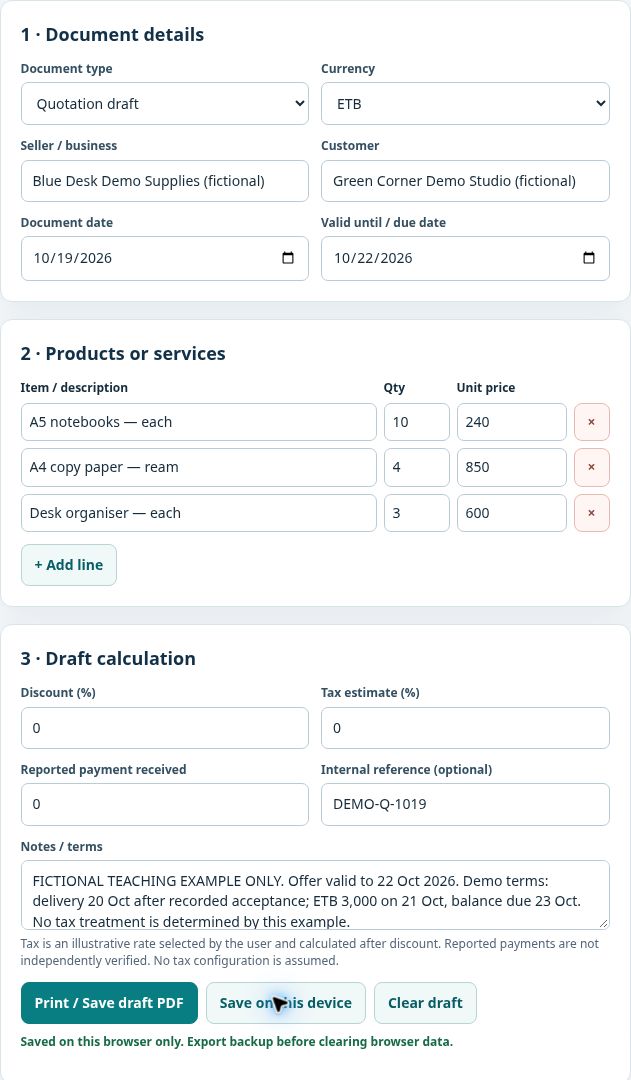
Choose Quotation draft, then change Currency to ETB. Enter the fictional seller and customer. Set Document date to 2026-10-19 and Valid until / due date to 2026-10-22. That second field is the quotation’s validity date at this stage.
Enter the first description, quantity and unit price. Click + Add line for the second and third items. State the unit in each description so that “4” means four reams rather than four sheets or cartons. Check the three products and their ETB 7,600 total before continuing.
Leave Discount (%), Tax estimate (%) and Reported payment received at zero for this quotation. Enter DEMO-Q-1019 in Internal reference (optional). Use Notes / terms to identify the fictional example, validity, delivery assumption and payment dates.
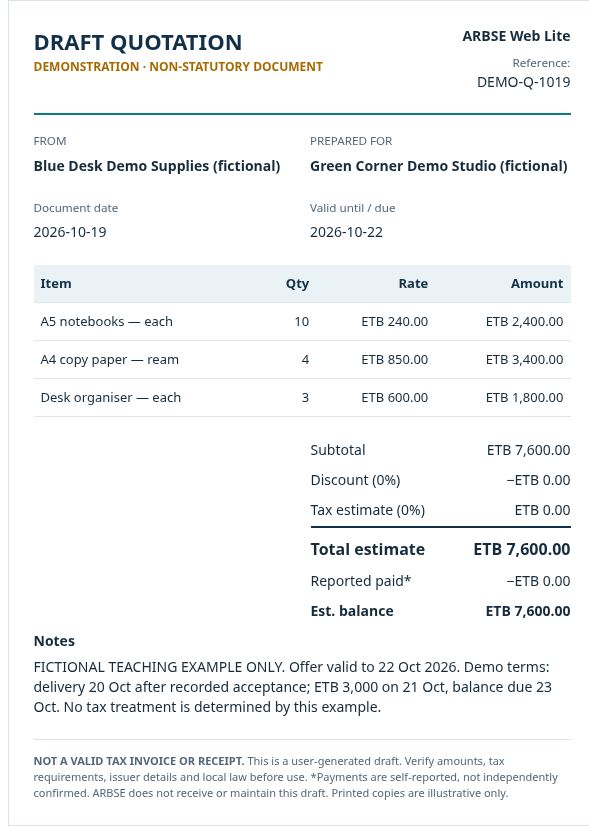
The live preview should show DRAFT QUOTATION, the reference and all three line amounts. Its ETB 7,600 “Est. balance” is only the draft calculation at this point; it is not a confirmed receivable or proof of acceptance.
Click Save on this device and check for “Saved on this browser only.” A changed preview alone is not a saved record. The optional local record list should then contain the quotation.
Each screenshot can be opened at full size by selecting the image.
2. Record what the customer actually accepted
In the fictional acceptance record, write:
20 October 2026 — Green Corner Demo Studio accepted quotation DEMO-Q-1019: the three listed items, unchanged quantities and prices, total ETB 7,600. Delivery is recorded for 20 October. ETB 3,000 is due on 21 October and the remaining ETB 4,600 on 23 October. Acceptance reference: DEMO-A-1020.
This is a teaching example, not an actual customer message. In a real transaction, retain the genuine email, signed document or other appropriate acceptance evidence and verify who agreed. Resolve changes to quantity, price, delivery or payment terms before preparing the next document. Keep the accepted version; do not silently replace it with a revised offer.
Web Lite has no customer-acceptance or signature workflow. Writing “accepted” in Notes is a cross-reference, not independent confirmation that acceptance happened.
3. Prepare a separate invoice draft
Keep the quotation saved. Click Clear draft and read its confirmation: it clears the current on-screen draft while saved local records remain. This is different from Erase local records, which concerns the entire local list. Do not use Erase to switch documents.
In the new draft, select Invoice draft (non-statutory) and reselect ETB—Clear draft resets the currency to USD in this version. Re-enter the same seller, customer and three accepted line items. Use 2026-10-20 as the document date, 2026-10-23 as the due date and DEMO-I-1020 as the internal reference. Cross-reference DEMO-Q-1019, DEMO-A-1020 and DEMO-DLV-01 in Notes.
At initial preparation, reported payment is zero and the estimated balance is ETB 7,600. Save the new draft and confirm the save message. The local list now contains a quotation and an invoice draft for the same transaction.
This is a controlled manual transfer of accepted details, not an automatic “convert quotation to invoice” feature. Changing the type of a loaded quotation and saving it would update that saved draft. Starting a separate draft preserves the quotation independently.
4. Apply the partial payment without inventing evidence
The fictional payment log records DEMO-PAY-01: ETB 3,000 received on 21 October, allocated to DEMO-I-1020. For a real payment, check the independent receipt or bank evidence first. Confirm payer, amount, date, reference and allocation; a customer’s promise or an unexplained transfer screenshot is not enough by itself.
Load the invoice draft if needed. Enter 3000 in Reported payment received and add the payment-log reference to Notes. Check:
ETB 7,600 − ETB 3,000 = ETB 4,600 outstanding.
Save and confirm the message again. The label Reported paid* and the warning that payments are not independently confirmed must remain visible. Web Lite displays your input and subtraction; it does not collect the payment or check the bank.
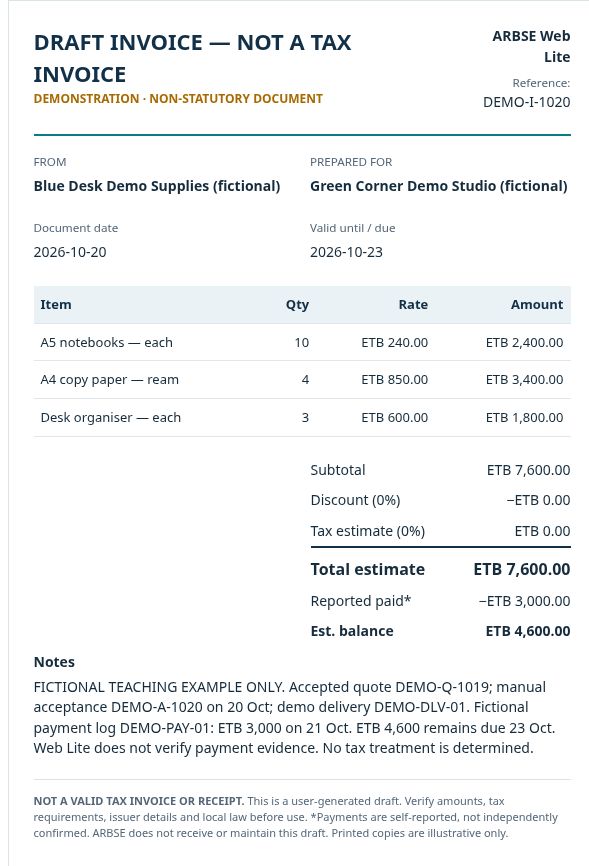
Keep a separate dated payment log. This version has one cumulative payment field, not an instalment-by-instalment ledger with evidence attachments, reconciliation or automatic reminders.
5. Save, export and reopen deliberately
Saving is optional and local to the current browser. It is not automatic. In the demonstration, reloading the page reset the working form but left the saved list available. Selecting Load on the invoice dated 20 October restored its ETB 3,000 reported payment, ETB 4,600 balance, reference and notes. Verify the type and date when choosing a record; the list is not a full audit register.
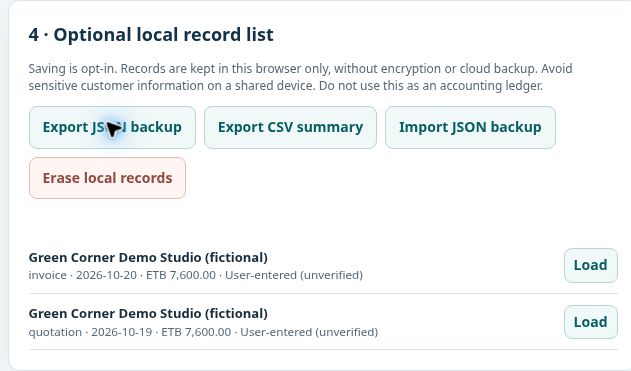
The two download buttons serve different purposes:
- Export JSON backup: downloads the saved local records with line items, dates, parties, reference, Notes and reported-payment fields. The demonstration retained a partial-payment export before updating the final balance.
- Export CSV summary: downloads document identifiers, type, date, parties, currency and summary amounts. It does not contain the full line-item and Notes detail needed to recreate the drafts. Its “Draft reference” column uses the application’s generated internal ID, not the custom Internal reference shown on the document.
Both exports operate on all saved local records, not just the current preview or an unsaved edit. Check what the file contains before sharing it. Keep exports with clear dates or stage names so that a later download does not obscure an earlier version. Saving an edited, loaded draft updates that record; it does not build a permanent revision history.
The interface also offers Import JSON backup and Print / Save draft PDF. This walkthrough verified the JSON/CSV downloads and Load workflow. It did not test a JSON restore or complete a browser PDF save. The print control uses the browser’s print function; a browser’s printing or PDF capability does not make the draft statutory or turn it into payment evidence.
6. Follow up, then record the final payment
On 22 October, the teaching record still shows ETB 4,600 due on 23 October. A useful follow-up refers to the agreed transaction and asks for confirmation:
Regarding DEMO-I-1020, based on accepted quotation DEMO-Q-1019: total ETB 7,600; payment recorded on 21 October ETB 3,000; balance ETB 4,600 due on 23 October. Please confirm that your records agree or identify the item requiring correction.
This example message is not sent by Web Lite. Assign an owner and next follow-up date in the separate transaction record. If the customer disputes an item, identify the disputed amount and evidence needed instead of changing the payment figure to force a zero balance.
The final fictional payment, DEMO-PAY-02, is ETB 4,600 on 23 October. Total payments are now 3,000 + 4,600 = 7,600. Enter 7600, the cumulative amount, in Reported payment received—not 4600, the latest instalment. Update Notes, save and retain a final export.
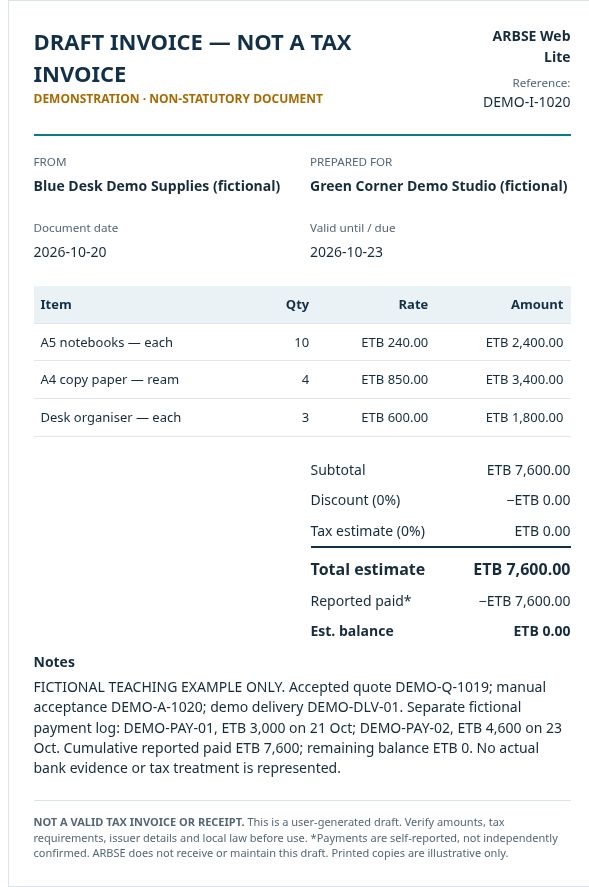
Payment-status record
“Paid” below means cumulative payments allocated in the fictional manual log. “Balance” is the remaining amount against invoice draft DEMO-I-1020; it is not a sum of every draft in the local list.
| As of | Paid, ETB | Balance, ETB |
|---|---|---|
| 20 Oct · initial invoice draft | 0 | 7,600 |
| 21 Oct · DEMO-PAY-01 | 3,000 | 4,600 |
| 22 Oct · follow-up | 3,000 | 4,600 |
| 23 Oct · DEMO-PAY-02 added | 7,600 | 0 |
The second receipt is 4,600; the final table row is 7,600 paid to date. Independent arithmetic proves both positions:
- Initial total: 10 × 240 + 4 × 850 + 3 × 600 = 7,600.
- After the first payment: 7,600 − 3,000 = 4,600.
- Final cumulative payments: 3,000 + 4,600 = 7,600.
- Final outstanding balance: 7,600 − (3,000 + 4,600) = 0.
In a real transaction, the reviewer closes payment follow-up only after confirming the evidence and allocation. For matching receipts to the bank record, use the weekly cash-control and bank-reconciliation guide.
Mistakes that create a false balance
- Treating a quotation as a second sale. This demonstration saves two drafts of one transaction. Adding both ETB 7,600 totals would produce ETB 15,200, which is not the value of two completed sales.
- Summing every CSV balance as receivables. The preserved quotation still displays ETB 7,600 while the settled invoice shows zero. The quote’s draft calculation does not mean another ETB 7,600 is owed.
- Entering only the latest instalment. Entering 4600 after the final receipt would show 3000 still due. The field needs the cumulative 7600 supported by the separate log.
- Updating the preview without saving. Confirm the local save, then reopen the record when checking persistence.
- Overwriting the accepted quotation. Preserve it before creating or revising the invoice draft. Keep a link between the references.
- Calling an unexplained short payment a discount. Obtain the reason and the appropriate approval; keep the difference open until resolved.
- Confusing a draft or self-reported payment with a valid tax invoice or receipt. Use the required real documentation and independently verified payment evidence.
What is entered, stored and exported
The demonstrated inputs are seller/customer names, document type and dates, currency, descriptions, quantities, prices, calculation inputs, internal reference and Notes. There are no real contact details, bank accounts or client records in these screenshots.
In the inspected live version, editing and calculations run in the browser. Save on this device writes the saved records to browser local storage. The application’s served code contains no routine for sending draft contents to ARBSE or synchronising them to a server. Loading the website itself is still a website visit; it is different from uploading the contents of a draft. See the website privacy policy.
Local records are not encrypted or cloud-backed up by Web Lite. They may be accessible to another person using the same browser profile. Clearing browser data, changing profiles or using another device can remove or separate access to that list. Exported JSON and CSV files are copies containing the entered information; protect them and check every record before sharing. Export is not proof of an off-device backup until you retain a recoverable copy somewhere appropriate.
Use only information needed for the draft. Keep bank credentials, account statements, identity documents, sensitive personal details and confidential correspondence out of Notes. Contact-form inquiries are a separate workflow: information you deliberately submit there is sent to ARBSE for a response; the drafting utility does not automatically attach your local records.
Reusable transaction checklist
- ☐ Give the quotation a clear reference, date, validity period and agreed units.
- ☐ Recalculate every quantity × rate and the total; resolve the actual tax/fiscal documentation required for the business.
- ☐ Retain the genuine acceptance of the correct version, including agreed changes and payment dates.
- ☐ Preserve the quotation; prepare the separate billing record and cross-reference its source.
- ☐ Keep appropriate delivery or service-completion evidence separately.
- ☐ Verify each receipt, identify the payer and allocate it once to the correct transaction.
- ☐ Maintain a dated payment log with individual receipts and cumulative totals.
- ☐ Recalculate total less payments and approved adjustments; leave unexplained differences visible.
- ☐ Confirm the saved draft, retain dated exports and verify that the intended record reopens.
- ☐ Assign the next follow-up, reviewer and evidence needed before closing the balance.
Retain the quotation, acceptance, required issued documents, delivery evidence, payment proofs, dated payment log, draft exports and review notes together. The person maintaining the record prepares the balance; an owner or another authorised reviewer checks evidence and changes. Escalate unknown payments, changed payment instructions, duplicate receipts, disputed quantities or an unexplained balance to the owner before treating the matter as settled. Agree the next action and date with the responsible person. No legal retention period or statutory collection deadline is prescribed here.
The four questions now have distinct answers: what was agreed is in DEMO-Q-1019 and DEMO-A-1020; what was prepared for billing is in DEMO-I-1020 and the required real documents; what was paid belongs in the verified payment evidence and dated log; what remains comes from the checked balance calculation.
For an unresolved sales-record or receivables-control problem, Focused Decision Review explains the advisory scope. Describe the problem and timing in an initial inquiry; keep confidential records out of the public form.
Method note
The transaction, arithmetic and screenshots were prepared for this original ARBSE resource. Web Lite features were checked against the live version 0.1 interface and its actual JSON/CSV outputs on 26 October 2026. Business.gov.au’s explanation of invoices and receipts provides further reading on their different purposes. Its jurisdiction-specific legal requirements are not adopted as Ethiopian rules in this guide.